GitHub Flavored Markdown (GFM) Explained: Tables, Task Lists, and Real-World Usage
In the world of software development documentation is just as important as the code itself. When you are working on open-source projects or managing documentation or even publishing technical blogs it is really important that your writing is clear and easy to understand. This is where GitHub Flavored Markdown comes into play.
GitHub Flavored Markdown is built on the standard Markdown. It has some extra features that make it very powerful. Because of this GitHub Flavored Markdown has become the way that developers format their writing all around the world. GitHub Flavored Markdown is used for README files and for tracking issues. Making pull requests, which is how teams talk to each other.
In this guide we will take a look at what GitHub Flavored Markdown is and how it is different from traditional Markdown. We will also learn how to use the features of GitHub Flavored Markdown, such, as making tables and task lists and we will see some real examples of how it is used. By learning how to use GitHub Flavored Markdown you will be able to make structured documentation that you can work on with your team.
What's GitHub Flavored Markdown?
GitHub Flavored Markdown is a version of Markdown.
It is made by GitHub.
It helps make text look good and makes it easy for people to work together on code.
Standard Markdown is good, for things.
It helps with headings, lists, links and making some words stand out.
Github Flavored Markdown does more.
It adds features that're useful for developers.
These features include:
- Tables
- Task lists (checkboxes)
- Strikethrough text
- Syntax highlighting
- Automatic URL linking
- Mentions and references
- Extended code block features
GFM is widely supported across:
- GitHub repositories
- GitHub Issues and Pull Requests
- GitHub Wikis
- GitHub Discussions
- Many static site generators
- Documentation platforms
If you work with GitHub, mastering GFM is essential.
Core Differences Between Standard Markdown and GFM
Let’s quickly compare standard Markdown with GitHub Flavored Markdown:
| Feature | Standard Markdown | GitHub Flavored Markdown |
|---|---|---|
| Headings | ✅ Yes | ✅ Yes |
| Lists | ✅ Yes | ✅ Yes |
| Code Blocks | ✅ Yes | ✅ Yes |
| Tables | ❌ No (native) | ✅ Yes |
| Task Lists | ❌ No | ✅ Yes |
| Strikethrough | ❌ No | ✅ Yes |
| Autolink URLs | Limited | Enhanced |
| Syntax Highlighting | Limited | Advanced |
GFM focuses on usability in collaborative coding environments.
Tables in GitHub Flavored Markdown
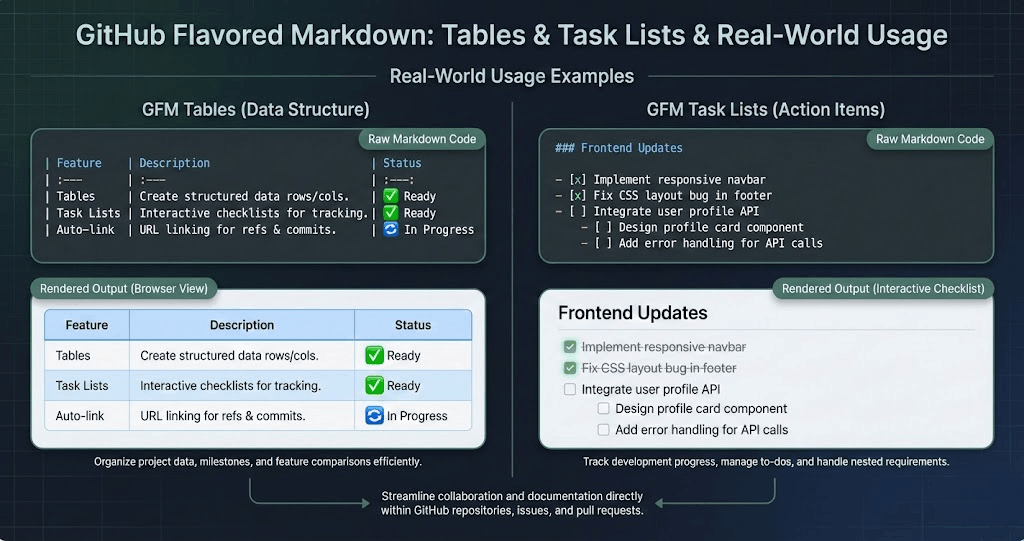
Tables are one of the most powerful additions in GFM. They allow structured data presentation without HTML.
Basic Table Syntax
Here’s how you create a simple table in GFM:
| Name       | Role         | Experience |
|------------|--------------|------------|
| Alice      | Developer    | 5 years    |
| Bob        | Designer     | 3 years    |
Output:
| Name | Role | Experience |
|---|---|---|
| Alice | Developer | 5 years |
| Bob | Designer | 3 years |
Aligning Table Columns
GFM allows column alignment using colons:
| Name  | Role      | Salary |
|:------|:----------|-------:|
| Alice | Developer | 80000  |
| Bob   | Designer  | 60000  |
:--- → Left aligned
:---: → Center aligned
---: → Right aligned
This is especially useful when displaying financial data, statistics, or reports.
Real-World Use Cases for Tables
Tables are widely used for:
- Feature comparisons
- API documentation
- Project roadmaps
- Pricing tiers
- Status dashboards
- Configuration matrices
Example: Feature Comparison
| Feature | Free Plan | Pro Plan |
|---|---|---|
| Unlimited Repos | ❌ | ✅ |
| Private Projects | ❌ | ✅ |
| Priority Support | ❌ | ✅ |
This format improves scannability and professionalism in documentation.
Task Lists in GitHub Flavored Markdown
Task lists are interactive checkboxes that allow users to track progress directly in issues and pull requests.
Basic Task List Syntax
- [ ] Set up repository
- [x] Create README file
- [ ] Configure CI/CD pipeline
Output (on GitHub):
- Set up repository
- Create README file
- Configure CI/CD pipeline
Checked items use [x] and unchecked items use [ ].
Why Task Lists Matter in GitHub
Task lists are not just visual elements — they are interactive.
When used in:
- Issues
- Pull Requests
- Project boards
They allow contributors to mark items as complete, which automatically updates project tracking.
Common Real-World Scenarios
- Feature development tracking
- Bug fix progress
- Release checklists
- Sprint planning
- Onboarding workflows
Example: Release Checklist
## Release v2.1 Checklist

- [x] Merge feature branches
- [x] Run integration tests
- [ ] Update documentation
- [ ] Deploy to production
This keeps teams aligned and organized.
Strikethrough Text in GFM
Strikethrough is simple but effective:
~~This feature is deprecated~~Output:
This feature is deprecated
Useful for:
- Marking outdated content
- Showing changes in documentation
- Tracking removed features
Syntax Highlighting for Code Blocks
GFM supports language-specific syntax highlighting:
function greet(name) {
  return \`Hello, \${name}\`;
}
This dramatically improves readability for:
- Code documentation
- Tutorials
- API examples
- Technical blog posts
Supported languages include:
- JavaScript
- Python
- Ruby
- PHP
- C++
- Go
- JSON
- YAML
- And many more
Autolinks and URL Handling
In GFM, URLs automatically become clickable:
You can also format links manually:
[Visit GitHub](https://github.com)GFM also automatically converts references like:
#123(issue reference)@username(mentions)
These features streamline collaboration.
Mentions and Issue References
GFM allows integration with GitHub’s ecosystem.
Examples:
@username→ Notifies a user#45→ Links to issue #45owner/repo#78→ Links across repositories
These features are invaluable in team-based workflows.
GFM in README Files
README files are often the first impression of a project. GFM enhances them with:
- Structured headings
- Tables for feature summaries
- Task lists for contribution guidelines
- Code snippets with highlighting
- Badges (using Markdown image syntax)
Example Structure:
# Project Name

## Features
## Installation
## Usage
## Contributing
## License
Clear structure improves SEO and developer engagement.
GFM in Issues and Pull Requests
In Issues:
- Bug reports use structured templates
- Task lists track resolution steps
- Tables summarize error logs
In Pull Requests:
- Checklists ensure quality control
- Code examples explain changes
- References link to related issues
GFM improves transparency and workflow efficiency.
Advanced Tips for Professional Documentation
1. Combine Tables and Task Lists
While you can’t embed checkboxes directly inside tables interactively, you can simulate structured progress tracking:
| Task | Status |
|---|---|
| Setup | ✅ |
| Testing | ❌ |
2. Use Collapsible Sections (GitHub-Specific)
You can use HTML within GFM:
<details>
<summary>Click to expand</summary>

Hidden content here.

</details>
This keeps documentation clean and organized.
3. Optimize for Readability
Best practices:
- Keep line lengths manageable
- Use whitespace generously
- Break sections with clear headings
- Avoid overly complex nesting
- Maintain consistent formatting
Readable documentation encourages contributions.
Common Mistakes to Avoid
- Misaligned tables (missing pipes)
- Incorrect checkbox formatting (
[x ]won’t work) - Forgetting language specifiers in code blocks
- Overusing bold and italics
- Mixing HTML unnecessarily
Consistency is key.
Why GitHub Flavored Markdown Matters for Teams
Modern software development is collaborative. GFM improves:
- Communication clarity
- Project management visibility
- Documentation professionalism
- Contributor onboarding
- Transparency in open-source projects
By using GFM effectively, teams reduce misunderstandings and increase productivity.
GFM Beyond GitHub
Although designed for GitHub, GFM is supported by:
- GitLab
- Bitbucket (partial)
- Static site generators
- Documentation tools
- Markdown previewers
Its influence extends far beyond GitHub’s platform.
SEO Benefits of Well-Structured Markdown
For developers publishing documentation or blogs:
- Clean headings improve crawlability
- Structured tables improve snippet potential
- Proper formatting reduces bounce rates
- Code blocks increase time-on-page
- Clear hierarchy improves indexing
Well-written Markdown contributes to better search visibility.
Final Thoughts: Mastering GFM for Professional Documentation
GitHub Flavored Markdown is more than just a formatting tool — it’s a productivity multiplier.
With tables, task lists, syntax highlighting, and collaborative features, GFM transforms simple text into structured, interactive documentation.
Whether you’re:
- Building open-source projects
- Managing enterprise repositories
- Writing technical blogs
- Tracking project milestones
Understanding and leveraging GFM gives you a professional edge.
- Start using tables for clarity.
- Use task lists for accountability.
- Structure your documentation intentionally.
When used strategically, GitHub Flavored Markdown becomes a powerful communication framework for modern development teams.