Markdown vs HTML for Documentation: Which One Should You Choose in 2026?
When it comes to creating technical documentation, developer guides, knowledge bases, or internal manuals, one question keeps surfacing:
Should you use Markdown or HTML for documentation?
Both formats are powerful. Both are widely used. And both serve different purposes depending on your workflow, technical expertise, and publishing needs.
In this in-depth guide, we'll explore:
- What Markdown is
- What HTML is
- Key differences between Markdown and HTML
- Pros and cons of each
- Which one is better for documentation
- How to convert Markdown into professional PDFs easily
- Why tools like Toflio can simplify your documentation workflow
Let's dive in.
What Is Markdown?
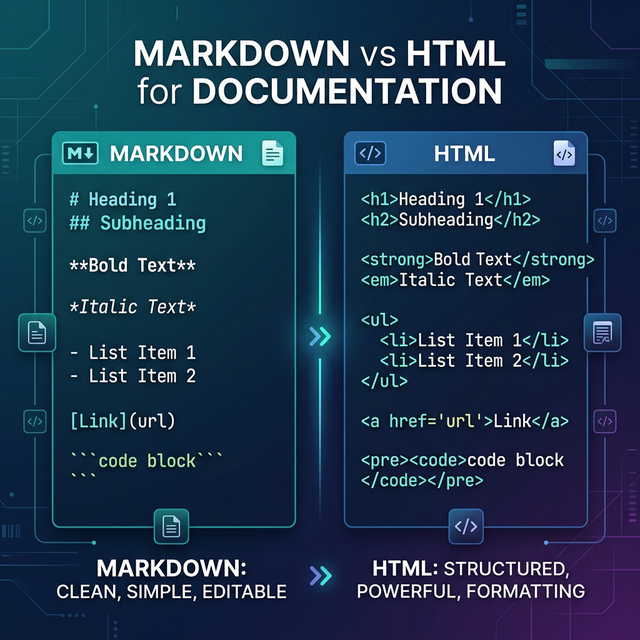
Markdown is a lightweight markup language created to make writing for the web simple and readable. Instead of using complex tags, Markdown relies on intuitive syntax.
For example:
# Heading 1
## Heading 2
**Bold Text**
*Italic Text*
- List item
It's minimal. Clean. Human-readable.
Markdown is widely used in:
- Technical documentation
- GitHub README files
- Developer guides (like API Documentation)
- Blogging platforms
- Knowledge bases
- Static site generators
Its biggest advantage? Simplicity. Check out our mastering Markdown basics guide to learn more.
What Is HTML?
HTML (HyperText Markup Language) is the backbone of the web. Every webpage you see in a browser is built using HTML.
An HTML version of a heading looks like this:
<h1>Heading 1</h1>
<p>This is a paragraph.</p>
<strong>Bold text</strong>
HTML provides full control over structure, layout, and styling when combined with CSS and JavaScript.
It's powerful — but more complex.
Markdown vs HTML for Documentation: Key Differences
Let's break down the major differences between Markdown and HTML.
1. Ease of Writing
Markdown
- Extremely easy to learn
- Minimal syntax
- Readable even in raw form
- Ideal for non-technical writers
HTML
- Requires knowledge of tags
- More verbose
- Harder to read in raw form
- Requires structured formatting
Winner for ease: Markdown
2. Learning Curve
Markdown can be learned in under 30 minutes.
HTML requires understanding:
- Tags
- Attributes
- Nesting rules
- Document structure
For teams that want speed and simplicity, Markdown often wins.
3. Flexibility and Control
Here's where HTML shines. HTML Advantages:
- Full layout control
- Custom styling with CSS
- Interactive elements
- Embedded scripts
- Advanced formatting
Markdown is intentionally limited. It's designed for writing, not complex layouts.
Winner for customization: HTML
4. Readability of Source Files
One of the strongest arguments for Markdown in documentation is source readability.
Open a Markdown file in a plain text editor — it's clean and understandable.
Open a complex HTML document — it can look cluttered and overwhelming.
For documentation teams reviewing content via Git or version control, Markdown is far easier to manage.
5. Collaboration and Version Control
Markdown integrates seamlessly with Git, GitHub, GitLab, and Bitbucket. Diff comparisons are clean and easy to track. This aligns perfectly with the Docs-as-Code philosophy.
HTML changes can be harder to review because even small edits may involve multiple tags.
For collaborative documentation projects, Markdown significantly improves workflow efficiency.
6. Performance and Output Options
HTML is native to browsers.
Markdown must be converted into HTML, PDF, DOCX, EPUB, etc. This is where modern tools make a difference.
If you're writing documentation in Markdown but need polished PDFs for clients, internal distribution, or product manuals, you need a reliable converter.
That's exactly where Toflio becomes valuable.
Why Markdown Is Dominating Modern Documentation
In recent years, Markdown has become the preferred format for developer documentation, API documentation, SaaS product guides, open-source projects, and internal knowledge bases.
Why?
Because documentation is primarily about clarity and content, not visual complexity. Markdown removes friction from writing. Writers focus on content instead of formatting. Developers appreciate clean repositories. Teams move faster.
When HTML Is Still the Better Choice
Despite Markdown's popularity, HTML still has strong use cases.
Choose HTML if you need:
- Highly customized layouts
- Advanced UI components
- Embedded media control
- Dynamic elements
- Interactive documentation
For complex web applications with interactive documentation portals, HTML combined with CSS and JavaScript may be necessary. But for most documentation use cases, Markdown is more than enough.
Markdown to PDF: A Common Documentation Challenge
Here's the reality: Most documentation starts in Markdown. But many organizations still need final output in PDF format.
Why?
- Client deliverables
- Compliance documentation
- Offline manuals
- Print-ready guides
- Internal reports
- eBooks
And converting Markdown to PDF isn't always smooth. Common problems include broken formatting, poor typography, missing styling, complex setup with command-line tools, and time-consuming configuration.
This is where simplicity matters.
A Smarter Way to Convert Markdown to PDF
If you're working with Markdown regularly and need professional PDF output, using an online converter designed specifically for this purpose saves hours of effort.
Toflio is a dedicated Markdown to PDF website that simplifies the entire process. Instead of installing heavy tools or configuring local environments, you can:
- Paste your Markdown
- Upload your .md file
- Generate a clean, professional PDF instantly
No technical setup. No complex commands. No formatting headaches.
For technical writers, developers, educators, and SaaS teams, this eliminates unnecessary friction.
Comparing Markdown vs HTML for Different Documentation Types
Let's break it down by use case.
1. Developer Documentation
Best Choice: Markdown. Why? Easy Git integration, clean source files, quick updates, and it is popular in developer ecosystems.
2. API Documentation
Best Choice: Markdown (with static generators). Most API docs are written in Markdown and rendered into styled HTML automatically.
3. Product Manuals (PDF)
Best Workflow: Write in Markdown, convert to PDF using a dedicated tool like Toflio. This ensures fast writing, clean version control, and professional output.
4. Corporate Knowledge Base
Best Choice: Markdown. Especially for internal teams collaborating via Git-based systems.
5. Marketing Landing Pages
Best Choice: HTML. Marketing pages often require custom layouts, animations, and styling precision. HTML wins here.
SEO Considerations: Markdown vs HTML
From an SEO perspective, both Markdown and HTML can perform equally well — because Markdown is ultimately converted into HTML for web display.
Search engines index HTML, not Markdown. The real SEO factor depends on proper structure (H1, H2, H3), clean semantic markup, fast loading times, mobile optimization, and good SEO practices.
Markdown encourages clean heading structure, which naturally supports good SEO practices.
Why Simplicity Wins in Documentation
Documentation is about clarity, maintainability, speed, and collaboration.
HTML offers control. Markdown offers productivity. And in documentation, productivity often wins.
That's why major platforms and developer communities rely heavily on Markdown.
The Ideal Workflow in 2026
For modern teams, the best workflow often looks like this:
- Write documentation in Markdown
- Store and version control using Git
- Render to HTML for web publishing
- Convert to PDF when needed using a reliable Markdown to PDF tool
This approach combines simplicity, flexibility, scalability, and professional output.
And this is precisely where Toflio fits naturally into the process. Instead of wrestling with local converters, LaTeX setups, or unstable plugins, you can generate clean PDF documentation instantly — saving time and reducing friction.
Pros and Cons Summary
Markdown
Pros:
- Easy to learn
- Fast to write
- Clean source files
- Excellent for collaboration
- Git-friendly
- Ideal for documentation
Cons:
- Limited layout control
- Requires conversion for PDF or web publishing
HTML
Pros:
- Full layout and design control
- Native browser support
- Highly customizable
- Supports dynamic elements
Cons:
- More complex
- Harder to maintain for large documentation projects
- Verbose and cluttered source files
Final Verdict: Markdown vs HTML for Documentation
If your primary goal is writing clear documentation, collaborating efficiently, managing versions easily, and generating PDFs when needed, then Markdown is the smarter choice.
HTML still plays an essential role in web rendering and complex layouts — but for documentation workflows, Markdown offers unmatched simplicity and efficiency.
And when you need to transform your Markdown files into professional PDF documents, a specialized solution like Toflio makes the process seamless.
Conclusion
The debate between Markdown vs HTML for documentation isn't about which one is "better" universally.
It's about choosing the right tool for the right purpose.
HTML powers the web. Markdown powers productivity.
In modern documentation workflows, Markdown often wins — especially when paired with efficient conversion tools.
If you're serious about streamlining your documentation process, improving collaboration, and generating clean PDFs effortlessly, exploring a dedicated Markdown to PDF platform like Toflio can significantly enhance your workflow.
In 2026 and beyond, simplicity, speed, and scalability define great documentation.
Markdown delivers all three. Cheers!